In-cab maintenance alerts for light vehicle fleets
Every light vehicle knows when it’s due.
In-cab service and wheel-nut retorque alerts, a live workshop board and prestart fault tracking for mine-site light vehicle fleets.
At a glance
The maintenance plan, visible from the driver’s seat and the workshop wall.
LV Sentry is a fixed in-cab notification system for mine-site light vehicles. A small unit behind the dash lights a lamp when the vehicle is due for service, or when its wheel nuts are due a retorque check. The workshop sees the same picture on a wall screen and a web board, signs work off by name, and gets a retorque register and a missed-service report as a by-product.
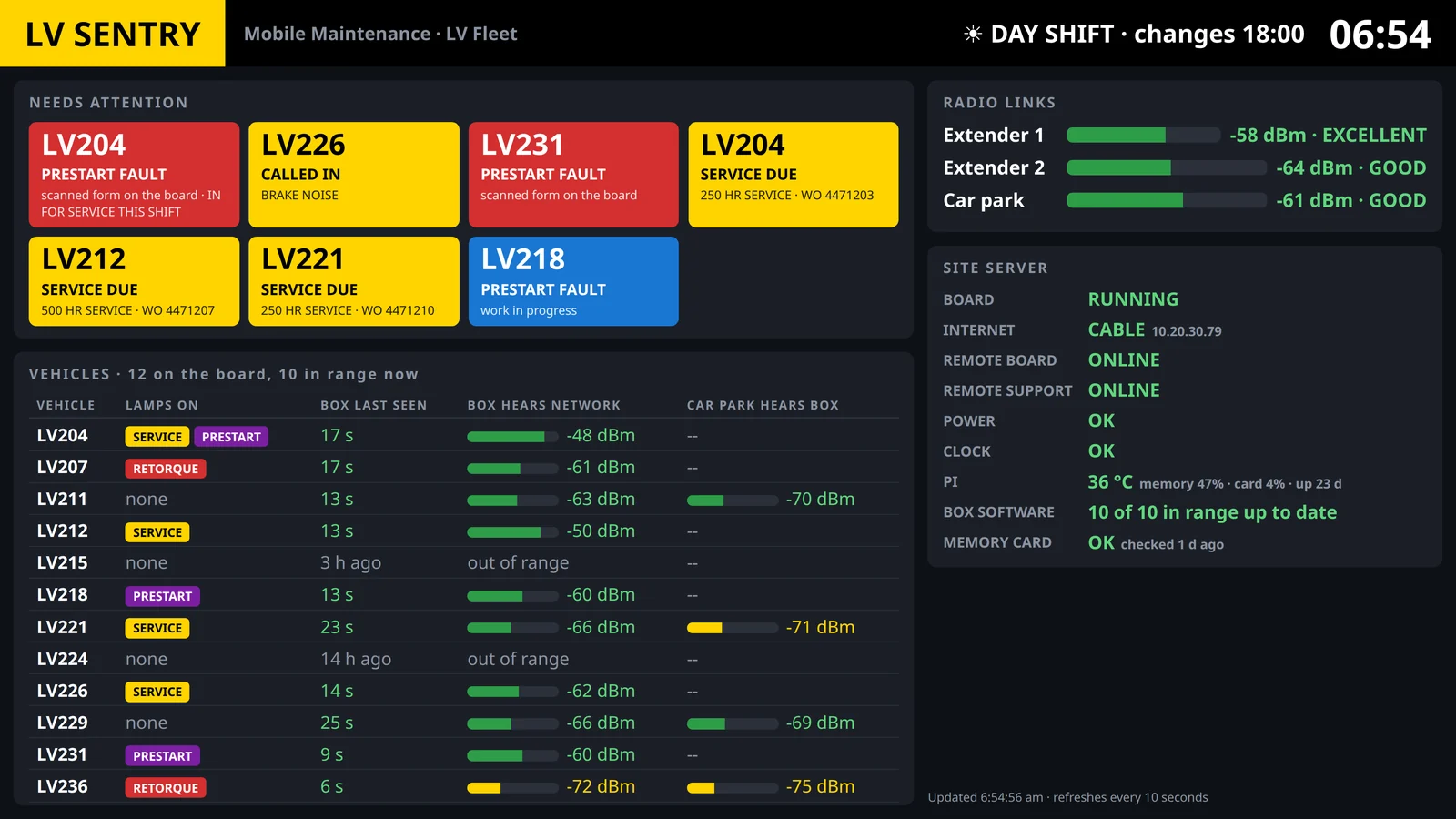
The workshop wall screen. Demonstration fleet: vehicle numbers and names are fictional.
In daily mine-site service in Western Australia. Well received by operators and fitters.
Two lamps and a windscreen label. No screen, app or login for the operator.
Its own Wi-Fi coverage where vehicles already stop. No SIM cards. No connection to the site network required.
Every action logged with who, when and why. The retorque register and missed services export to CSV.
One-off purchase per vehicle plus site setup. No subscription or licence fees.
Version 2 adds a diagnostic-port connection for fault codes and odometer, and GPS location.
The gap
The plan is rarely the problem. The last step is.
Every site has a service schedule, a retorque procedure and a prestart book. All three depend on the same two things: someone remembering at the right moment, and the message reaching the right person.
The schedule is published. The vehicle does not arrive.
Planning issues the week’s services. The operator is on another crew’s vehicle, or never saw the email. A fitter goes looking, and the service bay sits empty.
The wheels come off. The retorque relies on memory.
After a tyre change or a brake job, the wheel nuts need checking again once the vehicle has done some work. A tag or a line in a book only helps if the vehicle and the fitter meet again.
The fault is written down. The form stays in the book.
Operators record defects on the prestart sheet every shift. Unless someone reads each sheet and raises a job, the workshop does not hear about them.
What regulators report
“The wheel nuts became loose and eventually stripped the thread on the wheel studs, causing the wheel to become dislodged from the assembly.”
NSW Resources Regulator, Weekly incident summary, week ending 18 July 2025, on an articulated dump truck. In the week ending 9 October 2026 it reported a watercart whose “left-hand rear wheel detached from the vehicle”. Its Safety Bulletin SB24-05 (August 2024) counted “4 significant incidents involving failed wheel assemblies” in four months.
“Supervisors should review pre-start documentation and ensure that identified defects are captured and dealt with.”
NSW Resources Regulator, Weekly incident summary, week ending 21 November 2025.
In Western Australia, WorkSafe Mines Safety wrote in December 2025 of incidents involving “light vehicles, heavy haulage equipment and other mobile plant”: “These incidents often result from losses of control, limited visibility or mechanical defects.” Plant must be maintained and inspected “in accordance with the manufacturer’s recommendations” (Work Health and Safety (Mines) Regulations 2022, r. 213).
These reports concern mobile plant and mine vehicles in general, not light vehicles alone, and not any site using LV Sentry. They are quoted to show the pattern.
LV Sentry puts the reminder in the vehicle and the answer on the workshop wall.
How it works
One loop, from the plan to the sign-off.
Swipe sideways to see the whole diagram.
Book services on the board by date and shift, or load the week from a CSV export of your planning system. Every row is shown for review before anything is saved.
The vehicle’s service lamp comes on at the start of the shift before the service is due, so the operator who has the vehicle is the one who sees it.
The wall screen and the board list what is due this shift, what has been called in, and which vehicles are in range of the workshop right now.
The fitter marks the job done under their name. The lamp goes out and the register is written. If the wheels were off, the retorque lamp comes on.
What is installed
A compact unit behind the dash, fed from a 12 V accessory circuit through its own fuse and surge protection. Two lamps fit a spare switch position, and a windscreen label says what each one means.
LV Sentry’s own Wi-Fi at the places vehicles already stop. No SIM cards, and no changes to the site’s wireless network.
A small on-site server holds the board, the register and the scans. Lamps keep working with no internet connection, and so does the board for any screen on the LV Sentry network.
In the cab
Two lamps. No screen, no login, nothing to learn.
The operator’s side of LV Sentry is two lamps in a spare switch position, and a label on the windscreen that says what each one means. Amber: bring it in for service. Red: the wheel nuts are due a check.
Illustration. Lamp layout follows the vehicle’s own switch panel. The windscreen label tells the operator what to do for each lamp.
What the operator sees after turning the key
Swipe sideways to see the whole chart.
Both lamps run a short self-test at every start, so a failed lamp is noticed.
A day-shift service lights from the start of the previous night shift, and the reverse. The vehicle arrives with the lamp already seen.
Each unit stores its flags. The lamps keep working out of coverage and update within seconds of the vehicle returning.
The workshop can light the service lamp for a one-off reason, such as a reported brake noise, without moving the scheduled service.
A fused 12 V accessory feed, the unit secured behind the dash, and the lamp pair in a spare switch blank. No connection to any vehicle system.
In the workshop
What needs attention this shift, on one screen.
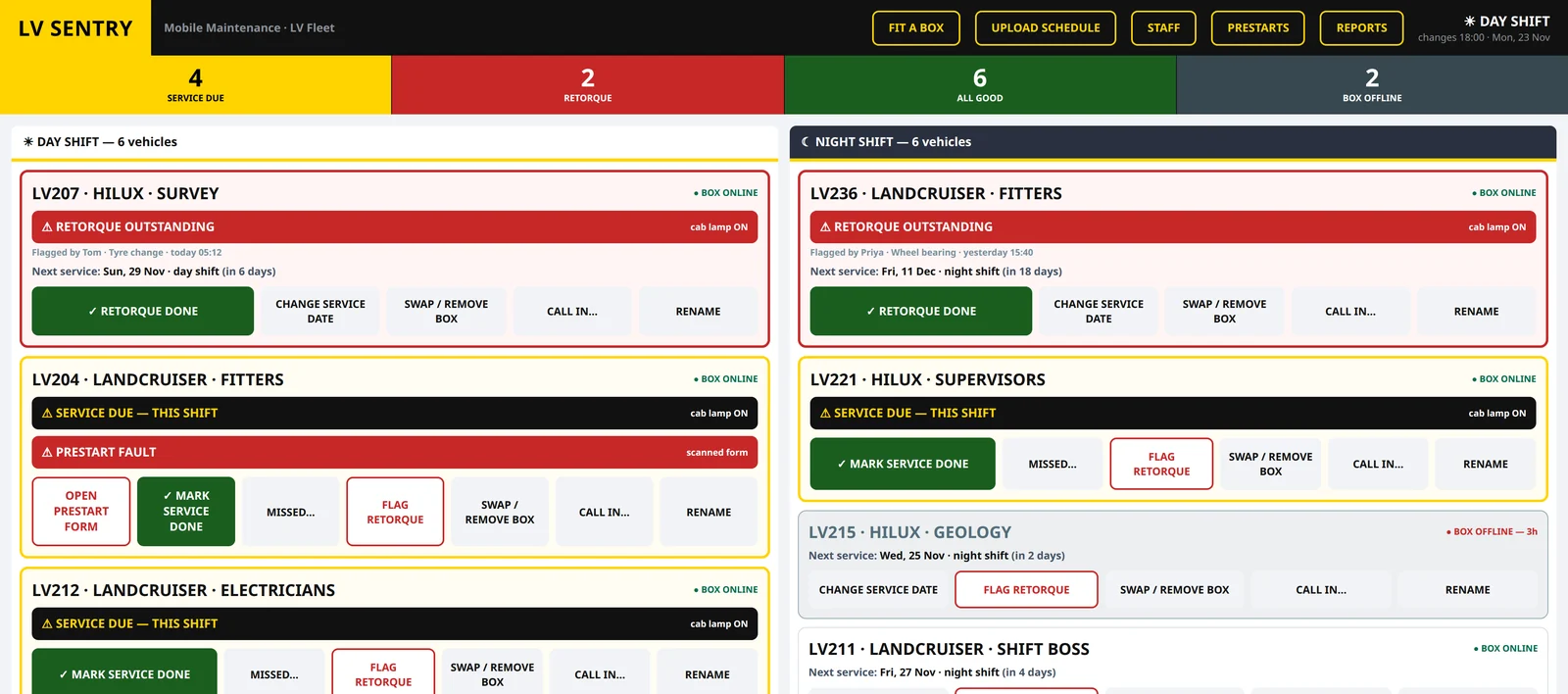
The board. Day and night shift columns, with every vehicle’s lamp state and unit status.
The working page for fitters and planners, in any web browser on site. Mark a service done, flag a retorque with a name and a reason, call a vehicle in, or log why a service was missed.
A read-only display for the workshop wall. Tiles show services due this shift, vehicles called in and open prestart faults. A fault on a vehicle already coming in for service is listed first.
Every action is recorded with who, when and why. Missed services and the full retorque history are on screen and export to CSV for your records.
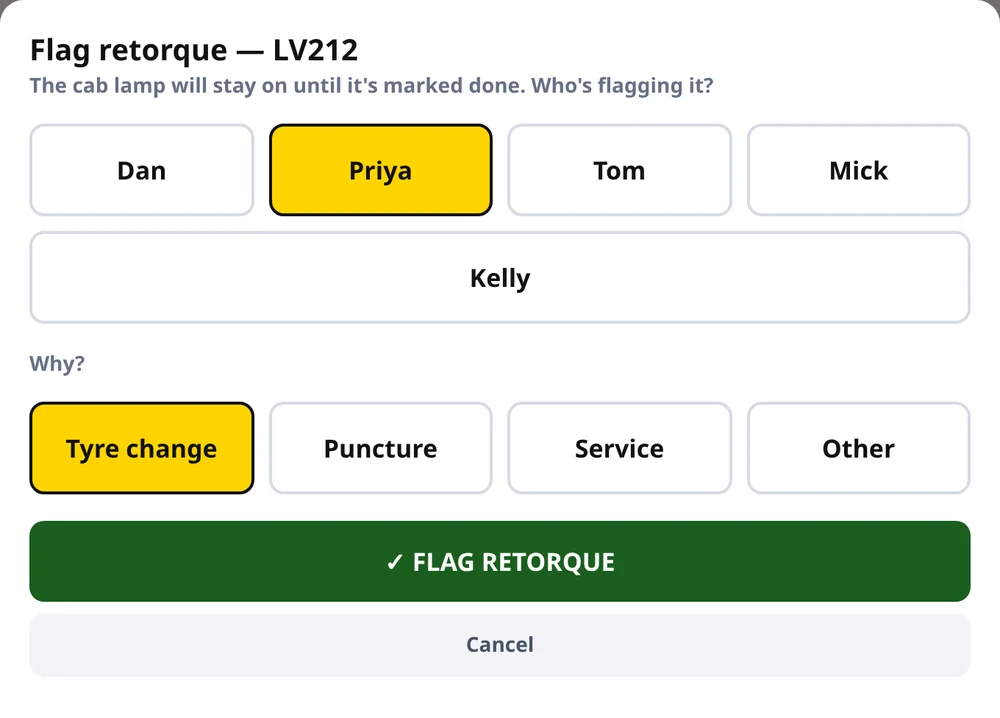
Flagging a retorque: a name, a reason, one confirm.
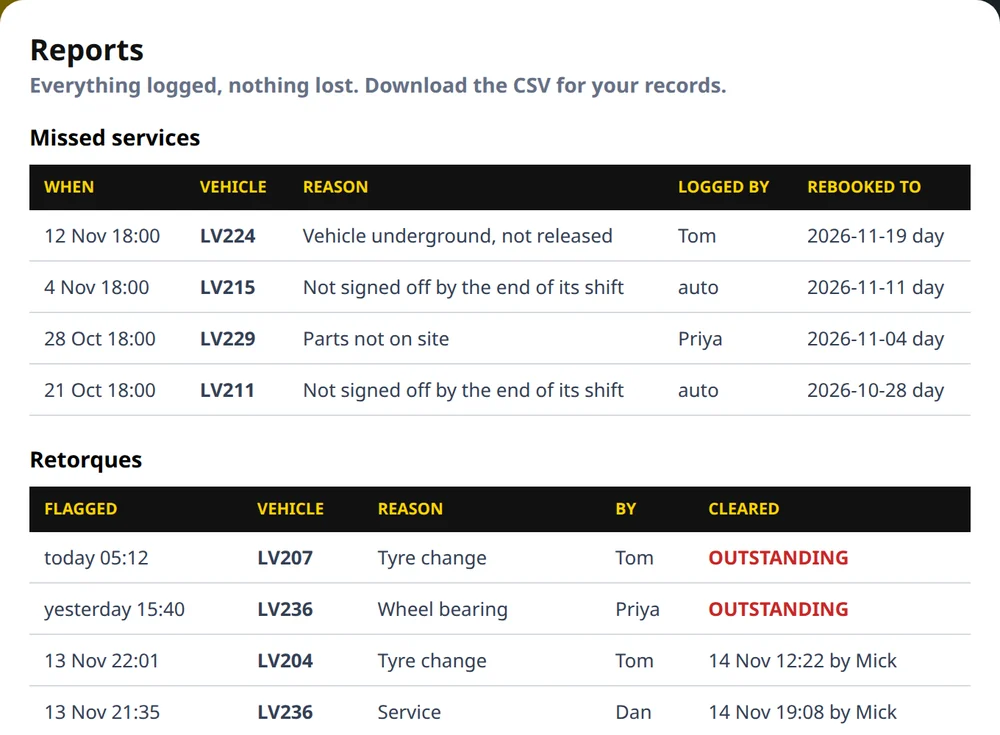
The register writes itself.
Prestart faults
The fault on the paper form reaches the fitter.
Paper prestarts stay as they are. Administration scans the day’s forms to an email address, or drops them on the board. Each page is matched to its vehicle and shown to the workshop as a prestart fault.
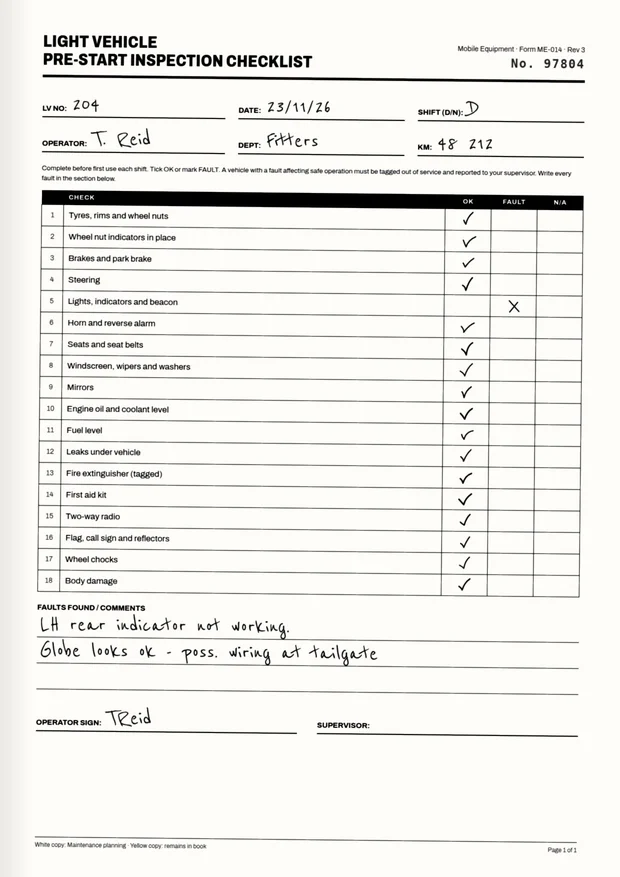
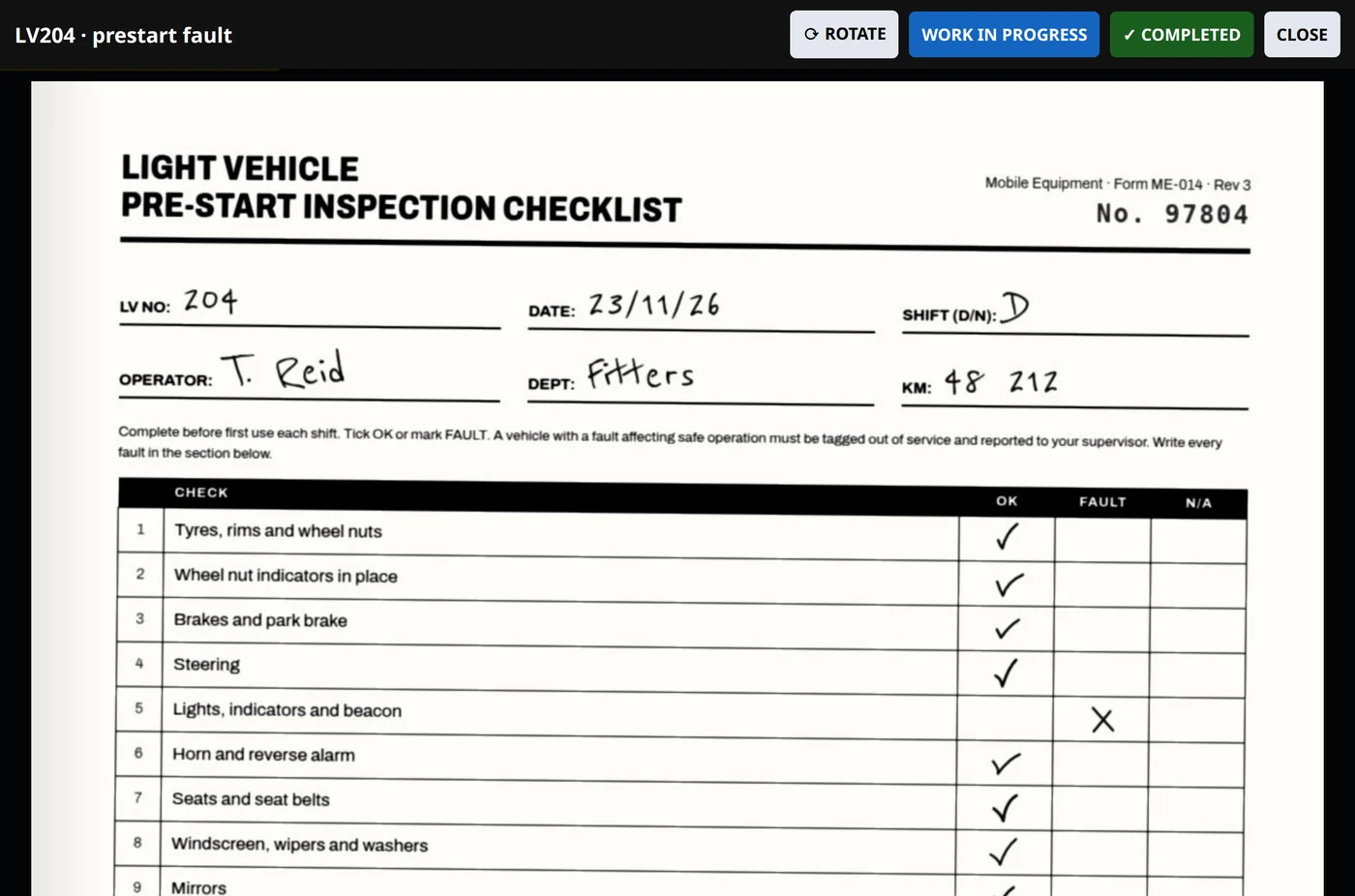
The scanned form, opened from the vehicle’s card. Demonstration form with fictional names.
A stack of forms in one PDF is split into pages. JPG and PNG work too. Nothing changes for the operator.
The handwritten LV number is read automatically. A form that cannot be read with confidence waits in an Unconfirmed list for a person to pick the vehicle.
The vehicle’s card and the wall screen show PRESTART FAULT, with the scanned form one tap away.
The fitter marks it work in progress or completed. A completed scan is deleted. The repair record stays in your maintenance system.

Forms without a confirmed vehicle raise a banner on the wall until someone assigns them.
About automatic reading
Reading the LV number uses a third-party AI service, so the scanned page leaves site to be read. It is optional. With it switched off, every form is assigned by hand and no scan leaves the server.
The benefits
The operator knows. The workshop knows. The record keeps itself.
LV Sentry closes the gap between the maintenance plan and the vehicle. Everyone who deals with a light vehicle gets what they need, where they already are.
Nothing to learn.
Two lamps say what the vehicle needs at every start. No screen, app, login or radio call.
One screen for the shift.
Services due, vehicles called in and open prestart faults in one place. A sign-off is a tap and a name.
The plan reaches the vehicle.
Load the week once. Each vehicle is told on the shift before, and a missed service is logged with a reason and rebooked.
A record, not a recollection.
Every retorque raised and every sign-off is recorded with who, when and why, and exports to CSV.
Very little to approve.
Its own Wi-Fi and an on-site server. No connection to the site network required, no SIM cards and no cloud dependency.
A known cost.
A one-off price per vehicle plus site setup. No subscription, licence or per-user fees.
lamps in the cab. That is the whole operator interface.
to fit each vehicle, from a fused 12 V accessory feed.
between check-ins while a vehicle is in coverage.
typical time from key-on to a vehicle’s first check-in.
simulated vehicles handled by the server software in bench testing.
SIM cards, subscriptions or licence fees.
Check-in time is typical of vehicles in service. The fleet figure is a bench test of the server software on a standard PC.
It keeps improving
Vehicle units update over the air, and the board updates on the site server. Added since the first release: missed services that log themselves, a signal and coverage log, lamp patterns refined on operator feedback, and prestart fault forms on the wall screen.
Built for site
On site, on its own network, and open to inspection.
LV Sentry was designed so that a site’s IT and OT teams have very little to approve. It does not need the site network to work, and nothing it stores leaves site unless you choose an option that says so.
Swipe sideways to see the whole diagram.
Vehicle units talk only to the LV Sentry server, over LV Sentry’s own Wi-Fi. They are never joined to the site network.
No connection to the site network is required. An optional firewalled link lets one nominated workshop PC open the board; other traffic from the site side is dropped.
The board, the register and the scans are held on the on-site server. Remote access for support or off-site planners is optional, outbound only, and by named sign-in.
Vehicle units update over the air while parked in good coverage. Each unit checks that an update arrived complete before installing it, and a unit that fails to update is flagged on the wall screen.
The server checks its own radio links, storage and clock, restarts after a fault, and shows its health on the wall screen next to the fleet.
Vehicle call signs, service dates, the names staff choose when signing off, and scanned prestart forms until they are closed out. Version 1 holds no location data.
What is next
Version 2: the vehicle starts reporting for itself.
Version 1 carries the workshop’s plan to the vehicle. Version 2 brings the vehicle’s own condition back to the workshop, on the network and board already in place.
Diagnostic-port connection
A connection to the vehicle’s OBD port reads what the engine computer already knows and puts it on the board against the vehicle.
- Check-engine lamp, stored and pending engine fault codes
- Odometer, so services can follow kilometres as well as the calendar
- Read-only standard requests. Codes are never cleared
GPS location
Last known position for every vehicle, shown beside its service status, so the workshop can find the vehicle that is due.
- Where the vehicle due this shift was last seen
- Position sent with each check-in and held on the site server
- Complements site IVMS. It is not a driver-behaviour system
- In-cab lamps for service and retorque
- Board and wall screen, shift aware
- Retorque register, missed-service log, CSV export
- Prestart fault forms by upload or email
- Over-the-air updates and a coverage log
- Diagnostic-port connection on LandCruiser and Hilux first
- Fault codes and odometer on the board and wall screen
- Battery voltage and coolant temperature
- GPS location on the board and wall screen
- Kilometre-based service intervals
- 24 V variant for trucks and light plant
- Larger-fleet views by crew and area
How Version 2 arrives
Software features reach units already in service over the air. The diagnostic-port connection and GPS need a Version 2 vehicle unit, which uses the same lamps, coverage points and server. Testing of the diagnostic connection on vehicles goes ahead only with the site’s approval. Roadmap items are plans, not commitments; dates are agreed with each customer.
Questions we are asked
Straight answers.
We already have IVMS. Why add this?
IVMS watches how a vehicle is driven. LV Sentry carries the workshop’s own schedule and retorque register into the cab and back again. It needs nothing from the IVMS and does not replace it.
Who raises a retorque?
The fitter. Ticking “wheels removed” at service sign-off raises it automatically, and any other wheels-off job is flagged with a name and a reason. LV Sentry reminds and records. It does not measure torque.
How large a fleet can it run?
On the bench, the server software has handled 1,000 simulated vehicles checking in every 30 seconds on a standard PC, with no errors. Coverage points are added to suit the site.
What if a vehicle is out of coverage?
Its lamps keep showing the last instruction received and update within seconds of returning. The board marks any unit that has not reported for five minutes, so nobody relies on a lamp that may not be lit.
What does it connect to on the vehicle?
Version 1 takes switched 12 V through its own fuse and drives two LEDs. It has no connection to the vehicle’s data bus or any vehicle system, and it draws power only when the accessory circuit is live.
What happens if something fails?
A failed unit shows on the board as out of range. The board and wall screen still show what is due. LV Sentry is a reminder aid; it does not replace your maintenance system, procedures or inspections.
Specification
Version 1.
| Vehicle unit | |
| Supply | 12 V DC switched accessory circuit, through an inline fuse, with transient suppression on the input |
| Indicators | Two 5 mm LEDs in a spare switch blank: amber for service, red for retorque. Windscreen instruction label. Self-test at every power-on |
| Radio | 2.4 GHz Wi-Fi (802.11 b/g/n) to LV Sentry coverage points only |
| Behaviour | Checks in every 30 seconds in coverage. Flags held in non-volatile memory and saved within 5 seconds of a change |
| Enclosure | 66 × 52 × 24 mm plus mounting wings, PETG. Mounted behind the dash |
| Fitment | Under one hour per vehicle. No connection to vehicle data systems |
| Site system | |
| Server | On-site server supplied, or deployed to a site-hosted Linux virtual machine. No cloud dependency |
| Screens | Board and wall screen in any current web browser on a PC, tablet or television |
| Records | Audit trail of every action; retorque register and missed services on screen and as CSV; 30 days of check-in history |
| Schedule | Booked on the board, or loaded from a CSV export with review before anything is saved |
| Prestarts | PDF, JPG or PNG by upload or email. Optional automatic reading of the LV number |
Download the two-page datasheet (PDF) or the full product overview (PDF).
Next step
See it working.
The quickest way to judge LV Sentry is to see it: a working unit, the lamps and the live board, on site or by video. About thirty minutes.
A working unit, the lamps and the live board, shown to your maintenance team.
Where vehicles stop, where the server sits, and a review with your IT or OT contact.
Units fitted, vehicles loaded, planners and fitters walked through the board.
From the first shift, the register shows what was due, what arrived and what was missed.
What is supplied
- Vehicle units with lamp assembly, windscreen label, loom, fuse and surge protection
- Site server, commissioning and coverage check
- Walk-through for planners and the workshop
- 12-month hardware warranty; failed units replaced
- Software and firmware updates for 12 months
Commercial model
- One-off price per vehicle, plus a one-off site setup
- No subscription, licence or per-user fees
- Fleet pricing from 25 vehicles
- Allow four to five weeks from order to commissioning, subject to site access and approvals
Ask for a walk-through.
Nick Lomas, Director
0415 270 753
[email protected]